LATEST
14
NEW
New endpoints
5
UPDATE
Updates
3
UPDATE
Breaking changes
0
Deprecated
NEW | API Reference | Auth oauth2_as_a_user (Required scopes: content.read or content.write)
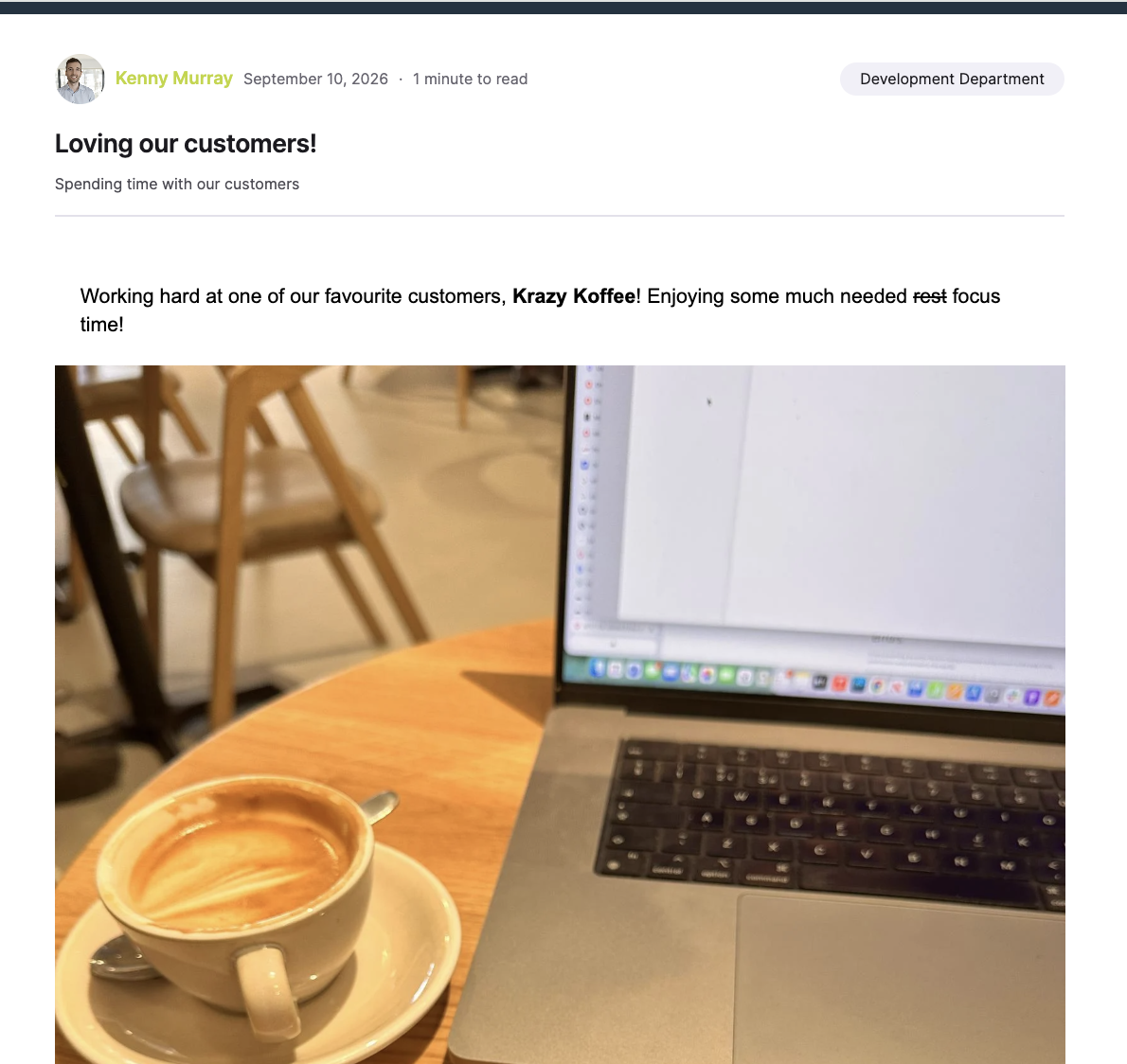
A new set of User Generated Content (UGC) endpoints enables authenticated users to create, manage, preview, and submit their own content.
An example of what our new UGC feature can look like:
The following endpoints allow users to create and manage their submitted content:
GET /v2/ugc/contentslists the User Generated Content submitted by the authenticated user.POST /v2/ugc/contentscreates a draft or published User Generated Content item.GET /v2/ugc/contents/{id}returns an individual User Generated Content item.PUT /v2/ugc/contents/{id}updates, publishes, or archives an item.POST /v2/ugc/contents/{id}/copycopies an existing item into a new draft.
The create and update endpoints support the following attributes:
titlebodysummarycontent_covertopic_idsattachmentsnotification_channelsis_translatableis_commentableis_shareablepublication_state
When creating content, publication_state supports draft and published. When updating content, it also supports archived.
There is no separate delete endpoint. To remove an item, update its publication_state to archived.
GET /v2/ugc/contents/{id}/preview returns a rendered preview of an item, including its current moderation status.
The optional width query parameter specifies the desired rendering width of the preview in pixels.
GET /v2/ugc/metadata returns the configuration and metadata needed to build a User Generated Content submission experience. This can include submission limits and the options available to the authenticated user.
The following endpoints return the destinations and audiences available to the authenticated user:
GET /v2/ugc/topicslists topics to which the user can submit content.GET /v2/ugc/audienceslists audiences available for targeting User Generated Content.
GET /v2/ugc/audiences supports pagination and filtering with:
pagepage_sizetypenameq
The maximum supported page_size is 100.
GET /v2/ugc/uploads/{filename} returns a pre-signed URL that a consuming application can use to upload a media attachment.
The response contains:
upload_url: The pre-signed URL to which the file should be uploaded.view_url: The URL where the uploaded file can subsequently be viewed.
POST /v2/ugc/link_previews retrieves title, description, and image metadata for a supplied URL.
This endpoint only retrieves preview metadata. It does not create or modify a User Generated Content item.
The request body requires:
url
Two endpoints have been added for retrieving and updating the attachment types users can include with User Generated Content:
GET /v2/settings/user_generated_contentPATCH /v2/settings/user_generated_content
The new Programs.UserGeneratedContentSettings.Resource schema contains:
images_enabledvideos_enabledfiles_enabledlinks_enabled
Each Boolean attribute indicates whether users can include that attachment type when submitting content. Attachment types are enabled by default.
The PATCH endpoint updates only the attributes included in the request. At least one attribute must be provided.
NEW | API Reference | Auth oauth2_as_a_user (Required scope: feeds.engage)
The GET /v2/comment_aliases endpoint returns the aliases the authenticated user is permitted to use when posting comments or replies.
An example of what this feature can look like:
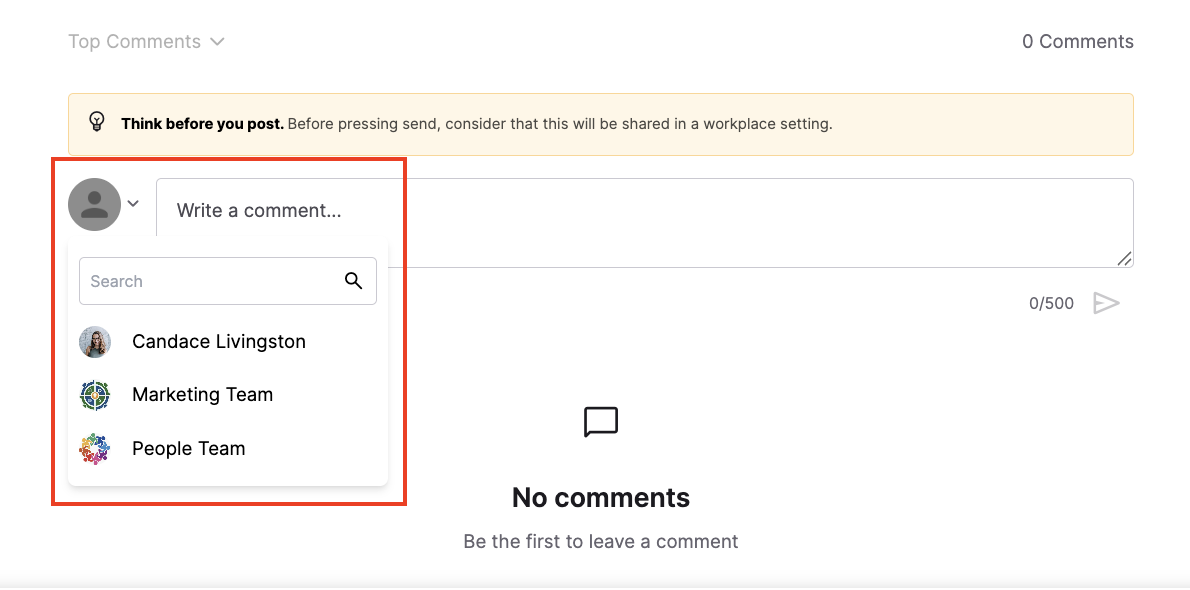
The endpoint introduces the Feed.CommentAlias.Resource schema:
id: The unique identifier of the alias.display_name: The name displayed for the alias.avatar_url: The image representing the alias, if available.alias_type: The type of alias, such as a user, team, or program.
The returned alias ID can be supplied as author_alias_id when creating a comment or reply.
UPDATE
The following request bodies now accept an optional author_alias_id attribute:
POST /v2/feed/posts/{content_id}/commentsPOST /v2/feed/posts/{content_id}/comments/{comment_id}/{post_number}/replies
Use an ID returned by GET /v2/comment_aliases to post on behalf of an available alias.
The alias can only be set when the comment or reply is created.
The Feed.Comment.Resource schema also now includes nullable author_alias_id. This allows comment and reply responses to identify whether the content was posted using an alias.
UPDATE | API Reference | Auth oauth2_as_a_user (Required scope: feeds.read)
The query parameters supported by GET /v2/feed/channels/posts have changed.
The following parameters have been removed:
namequery
The new search parameter searches posts in the channels followed by the authenticated user.
The removed name parameter previously supported the following named feeds:
followingrecommendedlatestpopularmost_contributedvisiblesearch
Integrations using the previous name or query parameters must be updated to use search.
UPDATE | API Reference | Auth oauth2_as_a_user (Required scope: feeds.engage)
The successful response from POST /v2/feed/posts/{content_id}/acknowledge has changed.
Previously, the endpoint returned 204 No Content. It now returns 200 OK with a data array containing the acknowledged Feeds.Post.Resource.
Integrations that expect a 204 response should be updated to accept the new 200 response and response body.
UPDATE | API Reference | Auth oauth2_as_a_user or oauth2_as_a_server (Required scope: data_exports.read)
The response structure has changed for:
GET /v2/data_exports/type/{type_name}GET /v2/data_exports/type/{type_name}/latestGET /v2/data_exports/type/{type_name}/files/{file_id}
The data property is now an array instead of an object.
For example, attributes previously accessed directly from data must now be accessed from an item in the array:
{
  "data": [
    {
      "presigned_url": "https://example.com/export.csv",
      "presigned_url_ttl_seconds": 900,
      "file_name": "export.csv"
    }
  ]
}Integrations that parse these responses as an object must be updated to handle the data array.
UPDATE
The promoted Boolean attribute has been removed from Content.Channel.Post.Resource.
This schema is used by the following topic operations:
GET /v2/channelsPOST /v2/channelsPUT /v2/channels/{channel_id}
You should no longer rely on promoted being accepted or returned by these operations.
UPDATE | Auth oauth2_as_a_user or oauth2_as_a_server (Required scope: users.write)
PUT /scim/v2/Users/{user_id} now documents a 409 Conflict response when an update causes a uniqueness conflict.
The new Scim.Error.409 response includes:
- schemas
- detail
- status
UPDATE | API Reference | Auth oauth2_as_a_user or oauth2_as_a_server (Required scope: users.write)
The documentation for DELETE /scim/v2/Users/{user_id} and POST /v2/Users/{user_id}/forget now clarifies that the operation only removes the user record from the authenticated program.
If the user belongs to multiple programs, their records in other programs are not removed.
For DELETE /scim/v2/Users/{user_id}:
- A successful deletion returns 204 No Content.
- A nonexistent user returns 404 Not Found.
For POST /v2/Users/{user_id}/forget:
- A successful request returns 202 Accepted.
- A nonexistent or already-forgotten user also returns 202 Accepted.
- The 202 response now contains {"data": null} because the user is removed asynchronously.
UPDATE
The documentation for scim.User.Core.photos.incoming now specifies a maximum request-body size of 200 MB.
This limit is particularly relevant when submitting a photo as a DATA URI because the image data is embedded directly in the JSON request payload. Requests exceeding the limit may be rejected.
Comment Aliases