All errors (4xx and 5xx) response bodies wrap in an “error” structure containing:
code(the numeric error code; e.g., 401, 402, etc.).title(the name of the error; e.g., Bad Request, Unauthenticated, etc.).detail(a description providing additional information; e.g., Access token was not provided or not recognized).
For example:
`{
  "error": {
    "code": 403,
    "title": "Unauthorized Access",
    "detail": "Access token was not provided or not recognized."
  }
}`
Some errors include additional data fields containing information about the error. For example, a validation error will contain a validations field as shown below:
`{
  "error": {
    "code": 400,
    "title": "Bad Request",
    "detail": "One or more request validations have failed. The request cannot be completed unless all validations are passed.",
    "validations": [
      {
        "code": "required",
        "detail": "Title is required",
        "parameter": "title"
      }
    ]
  }
}`A request parameter or formatting does not match an expected required format.
Error codes in the range 400 - 499 indicate invalid input or improper use of the API. Clients should alter their request to correct the indicated error before trying the request again.
Bad Request
A request parameter or formatting does not match an expected required format. Typical cases include:
- Missing a required parameter.
- Invalid formatting of a parameter (e.g., numerical value where text is expected, incorrect or invalid enum)
- Timestamp filter where the parameter value cannot be coerced to a date or time.
- Incorrect query or path parameter, invalid page size number, text instead of a numerical value, etc.
- Page number or size is not in valid range.
- Validation errors include an additional
validationsparameter that contains an array of validation entries specific to individual parameters in the request.
Feeds Example
Sending an incorrect query value with a GET results in a 400. This example shows the Return a user's feed of posts endpoint throwing an error. The name query parameter does not include one of the supported enum options of: "myfeed", "following", "resources", "trending", "icymi", "featured", "bookmarked", "community_images".
{
    "error": {
        "code": 400,
        "title": "Bad Request",
        "detail": "One or more request validations have failed. The request cannot be completed unless all validations are passed.",
        "validations": [
            {
                "rule": "invalid_enum",
                "parameter": "name",
                "message": "name must be one of: myfeed, following, resources, trending, icymi, featured, bookmarked, community_images"
            }
        ]
    }
}
Content Examples
This example shows the List all topics in the program endpoint throwing an error. The state query parameter does not include one of the supported enum options of: "archived", "hidden", "published", "any".
{
  "error": {
    "code": 400,
    "title": "Bad Request",
    "detail": "One or more request validations have failed. The request cannot be completed unless all validations are passed.",
    "validations": [
      {
        "rule": "invalid_enum",
        "parameter": "state",
        "message": "state must be one of archived, hidden, published, any"
      }
    ]
  }
}
This example shows the create content endpoint throwing an error.
Here, multiple validations are incorrect from the request body:
- An incorrect enum type was passed from the
content_typeparameter. The available enum validations are:"article","link","video","image". - The
user_idwas not a numerical value from theauthorobject. - An invalid
timestampwas passed (needs to be ISO 8601 format and are expressed in the UTC timezone.)
{
    "error": {
        "code": 400,
        "title": "Bad Request",
        "detail": "One or more request validations have failed. The request cannot be completed unless all validations are passed.",
        "validations": [
            {
                "rule": "invalid_enum",
                "parameter": "content_type",
                "message": "content_type is invalid"
            },
            {
                "rule": "numeric",
                "parameter": "user_id",
                "message": "user_id is invalid"
            },
            {
                "rule": "invalid_timestamp_or_datestamp",
                "parameter": "posted_at",
                "message": "posted_at is invalid"
            }
        ]
    }
}
Users Examples
This example shows the List users in the program endpoint throwing an error.
The filter has not been used correctly. username is frank is not the supported format.
{
    "schemas": [
        "urn:ietf:params:scim:api:messages:2.0:Error"
    ],
    "status": 400,
    "detail": "Validation failed: filter operation not supported: <userName is frank>.",
    "scimType": "invalidFilter"
}
The correct format just needs a username (or a section of a username); eq frank or just frank (provided there is an existing username with frank). Refer to our user names section for more guidance.
This example shows the custom attributes extension object of the Create user endpoint throwing an error.
`"urn:ietf:params:scim:schemas:extension:SocialChorus:2.0:User:customAttributes": {
  "pay_type": "Salaried",
  "state": "CAL",
  "remote_worker": false,
  "is_manager": true
}`
This is because the custom attributes are not in string format, which is required. The correct format is:
"urn:ietf:params:scim:schemas:extension:SocialChorus:2.0:User:customAttributes": {
  "pay_type": "Salaried",
  "state": "CAL",
  "remote_worker": "false",
  "is_manager": "true"
}
See our Custom Attributes page for further guidance.
Unauthenticated
Returned when a required access token is not provided. Check:
- You are connected to the correct authentication server:
- US1: https://auth.socialchorus.com
- US2: https://auth.us2.onfirstup.com
- EU: https://auth.onfirstup.eu
- You are using the correct authentication method. Endpoints like Feeds require authorization as a user, endpoints like content require authorization as a server. Find the Security section in each endpoint's documentation to see the required auth method.
- Your session is still active. Access tokens expire after 2 hours. Authorization codes expire in 10 minutes.
See Authentication and Authorization for details.
Example
{
    "error": {
        "code": 401,
        "title": "Unauthenticated",
        "detail": "Access token was not provided or not recognized."
    }
}Forbidden
The Authenticated User does not have permissions required to perform the action requested. Check:
- The Security section in each endpoint's documentation to see the required scopes. See Auth Scope List and Definitions for details.
- You have the same (or higher) permissions or role as the user(s) you are attempting to get, create or edit with the Users endpoints.
Example
This example shows a user attempting to perform a PATCH request on another user account with a role higher to their own.
Role updates require the acting user's role to be the same or higher role than the user being updated both before and after the role update
{
    "schemas": [
        "urn:ietf:params:scim:api:messages:2.0:Error"
    ],
    "status": 403,
    "detail": "The authenticated user does not have permission to perform the requested action."
}Not Found
Returned when a primary resource is not found. A primary resource can be defined as resource scoped in the URL of the endpoint.
Examples
GET /content/{content_id}- if the passedcontent_idin the path does not exist or link to an existing piece of content, theGETresults in a 404.- The URL
channels/123/content/456results in 404 if the channel or the content doesn't exist, or if the content exists but is not associated to the channel. Additionally, requests for contextually private resources may return 404 as a way to avoid revealing the presence of the resource.
Conflict
Returned by some endpoints when attempting to use or update an identifier that is already taken by another record in that collection.
Too Many Requests
Returned when the rate limit is exceeded. The rate limit is 1,000 requests per minute, per program. A delay and a retry is recommended.
Error codes in the range 500 - 599 indicate an error on the server. Clients should retry their request again later, or contact support for assistance.
| Status Code | Description |
|---|---|
| 500 | Internal server error |
| 504 | Request timeout |
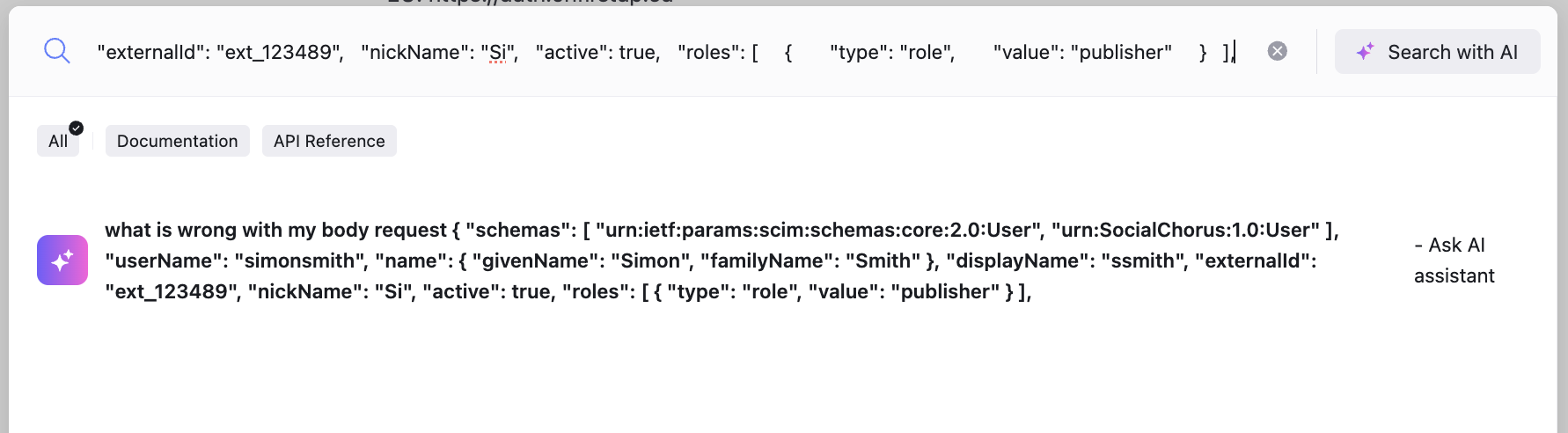
Ask our AI assistant to help troubleshoot issues:
- Select the search bar.
- Type in your question, copy any code, and give it the error code. You may want to also give it the endpoint. The more details it has, the better chance it has of troubleshooting.
- Select Search with AI, or Ask AI Assistant.
- This opens up your AI assistant chat bot. It may ask for more details if required.